


Draw Text
Draw text on an image.
Node Data | |
|---|---|
 | |
Display name | |
Draw Text | |
Internal name | |
Node_Text | |
Inheritances | |
| Node_Processor | |
| Node_Text | |
Inputs | |
Text | |
text |
Text |
enum |
Change Case |
Output | |
enum |
Dimension |
vec2 |
Fixed Dimension |
vec2 |
Offset |
ipadding |
Padding |
bool |
Atlas |
Font | |
font |
Font |
int |
Size |
bool |
Scale To Fit |
Font Settings | |
font |
Fallback Font |
vec2 |
Character Range |
bool |
Anti-Aliasing |
bool |
Use Sdf |
Letter Settings | |
float |
Letter Spacing |
float |
Line Height |
bool |
Monospaced |
Alignment | |
int |
Max Line Width |
bool |
Split Word |
enum |
H Align |
enum |
V Align |
Path | |
path |
Path |
float |
Path Shift |
bool |
Rotate Along Path |
Rendering | |
bool |
Round Position |
enum |
Blend Mode |
color |
Color |
palette |
Color By Letter |
surface |
Texture |
Background | |
bool |
Render Background |
color |
Bg Color |
surface |
Background |
Wave | |
bool |
Wave |
slider |
Wave Shape |
float |
Wave Amplitude |
float |
Wave Scale |
rotation |
Wave Phase |
Trim | |
bool |
Trim |
enum |
Trim Type |
range |
Range |
bool |
Use Full Text Size |
Outputs | |
surface |
Surface Out |
atlas |
Draw Data |
Attributes | |
| Color Depth | |
| Interpolation | |
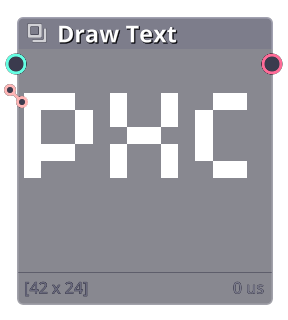
Draw text to surface.
Properties
| Text | |
| Text | Text to draw. |
| Change Case | (For latin alphabet) Change text case. |
| Output | |
| Dimension | Dimension type:\n - Fixed: Fixed size from vec2 value.\n - Dynamic: Set size automaticaly to fit the text content. |
| Offset | Shift draw position. |
| Padding | Add extra space in 4 directions. |
| Atlas | Output each character as array of surface atlases. |
| Font | |
| Font | Text font. |
| Size | Font size. |
| Scale To Fit | Scale text size to fit output dimension (in fixed mode). |
| Font Settings | |
| Fallback Font | Seconds font to use if a glyph is not existed in the main Font |
| Use Sdf | Use sdf to draw text. |
| Letter Settings | |
| Letter Spacing | Add extra horizontal space between letters. |
| Line Height | Add extra vertical space between lines. |
| Monospaced | Force each letter to has different width. |
| Alignment | |
| Max Line Width | Maximum line width before entering new line (in dynamic mode). |
| Split Word | When breaking into new line, whether to use space to divide word or split letter directly. |
| H Align | Horizontal alignment. |
| V Align | Vertical alignment. |
| Path (Fixed mode recommended) | |
| Path | Draw text along path. |
| Path Shift | Shift text along path. |
| Rotate Along Path | Rotate text to path direction. |
| Rendering | |
| Round Position | Round letter position to integer to prevent anti-aliasing. |
| Color | Base text color. |
| Color By Letter | Multiply color by letter. |
| Texture | Apply texture to each letter. |
| Background | |
| Bg Color | Background color. |
| Background | Add background surface, stretch to output dimension. |
| Wave | |
| Wave | Move text in wave pattern. |
| Wave Shape | Wave shape (0:Sin, 1:Triangle, 2:Square, 3:Sawtooth) |
| Wave Amplitude | Wave size. |
| Wave Scale | Wave width (how many letter can be affected by wave). |
| Wave Phase | Wave position. |
| Trim (Typewriter effect) | |
| Trim | Enable trim effect. |
| Trim Type | Trim type. |
| Range | Trim range. |
| Use Full Text Size | Force dynamic dimension to always fit the full text not trimed. |
Commit History
| 1.22.0.202 |
|
|---|---|
| 1.21.7.101 |
|
| 1.21.rc7 |
|
| 1.21.6.011 |
|
| 1.21.5.002 |
|
| 1.21.4.004 |
|
| 1.21.3.009 |
|
Related Links
- Base Code: /scripts/node_text/node_text.gml
- Shader [sh_text_freetype_render]: /shaders/sh_text_freetype_render/sh_text_freetype_render.fsh
- Shader [sh_node_text_render]: /shaders/sh_node_text_render/sh_node_text_render.fsh